Type “NEET coaching near me” or “maths tuition in [your area]” into Google, and look at what appears first. Usually it isn’t a website: it’s a map with three local businesses, their star ratings and a “Directions” button.
That’s the Google Business Profile. For a coaching institute with a physical centre, it’s often the first thing a parent sees, before your website, your Instagram or your banner outside. This guide shows you how to set up a Google Business Profile for your coaching institute, verify it, optimise it and earn genuine reviews, while staying within Google’s rules so your listing doesn’t get suspended.
What Is a Google Business Profile?
A Google Business Profile is the free listing that shows your business on Google Search and Google Maps. It shows your name, address, phone number, photos, reviews and directions.
For coaching institutes, it answers a parent’s first questions in seconds: Where is it? Is it near us? What do other parents say?
Can Every Coaching Institute Get One?
Not quite. According to Google’s eligibility guidelines, a business must make in-person contact with customers during its stated hours.
- Coaching centre that students visit: eligible. Show your address.
- Home tutor who travels to students: can create a service-area profile, with the home address hidden.
- Online-only coaching: not eligible. Google lists online-only businesses as ineligible. Focus on your website and SEO instead.
- Classes held in a space you don’t own or control (for example, a rented hall once a week): generally not eligible for that location.
How to Set Up Your Coaching Institute’s Profile
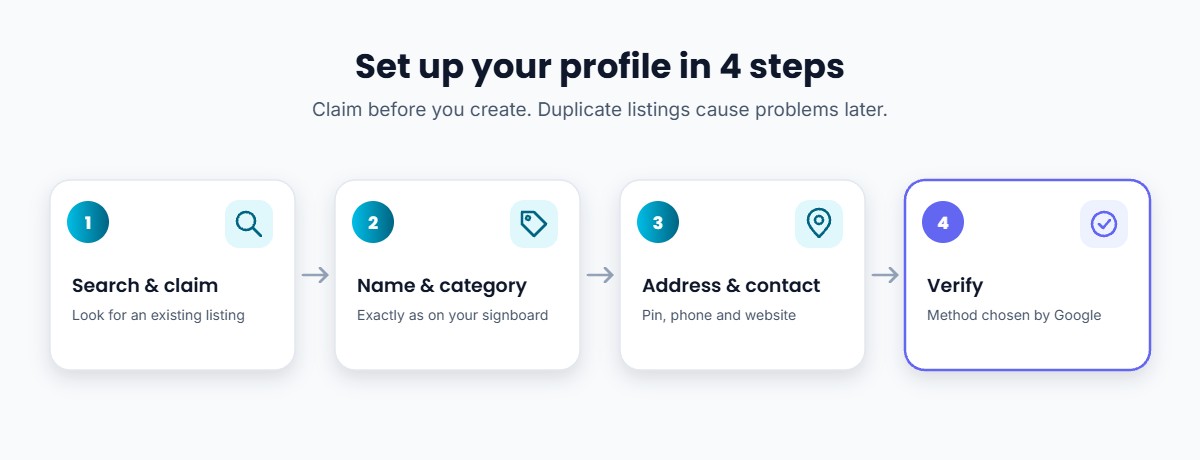
- Search for your institute on Google Maps first. A listing may already exist, created by a student or automatically. If so, claim it instead of creating a duplicate.
- Create or claim the profile at Google Business Profile with the Google account the institute will keep long-term, not a staff member’s personal account.
- Enter your real business name, exactly as it appears on your signboard.
- Choose your category. Pick the most specific one that describes what your institute is, such as a coaching centre or tutoring service.
- Add your address and pin the exact location on the map.
- Add your phone number and website. Use your main institute number and your institute website.
- Verify the profile (see below).
Verifying Your Profile
Google chooses the verification method for you, based on your business type, region and other details, and the method can’t be changed. Depending on your case, you may be offered:
- A phone call or text message
- An email
- A live video call, where you show your signboard, your centre and proof that you manage it
- A postcard with a code, which Google says usually arrives within 14 days
If video verification is offered, Google recommends it. Keep your signboard, classroom and documents ready before you start. While waiting for a postcard, don’t edit your name, address or category, or the code may stop working.
Don’t Get Suspended: Follow the Naming Rules
This is where many coaching institutes go wrong. Google’s guidelines say your business name should match your real-world name as used on your signboard, website and stationery. Extra words can lead to suspension.
| Not allowed | Allowed |
|---|---|
| Sharma Classes – Best JEE NEET Coaching in Kota | Sharma Classes |
| Excel Academy Near Railway Station | Excel Academy |
| BRIGHT FUTURE TUITIONS – Call 98xxxxxxxx | Bright Future Tuitions |
Put services, area and phone number in the fields meant for them (categories, address, description, phone), not in the name. Also make sure you have permanent signage with your institute’s name at the address.
How to Optimise Your Profile
Google says local results are based mainly on relevance, distance and prominence (how well known you are), and that there’s no way to pay for a better local ranking. Here’s what you can control:
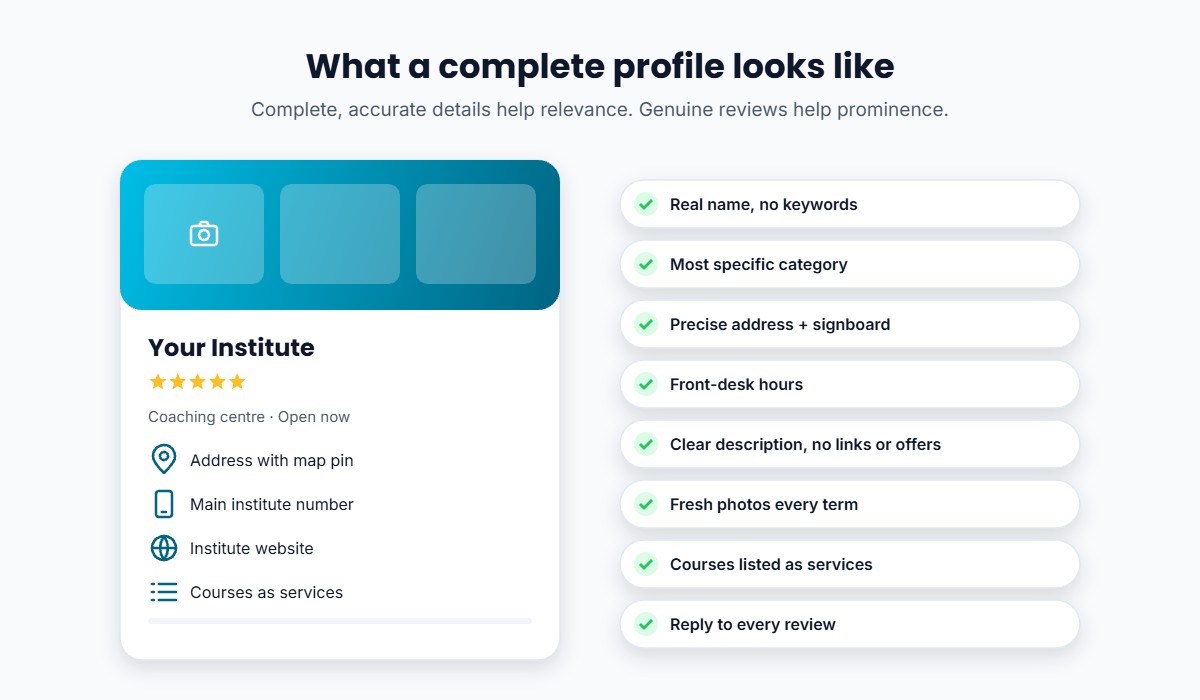
- Complete every field: category, address, phone, website, and the courses or services you offer.
- Write a clear description: who you teach, which exams, and your teaching approach. No links, offers or prices in the description.
- Hours: list the times your front desk or office is open to visitors. Don’t use individual batch timings as business hours.
- Photos: classrooms, the entrance and signboard, study material, and faculty (with permission). Update them every term.
- Posts and updates: share news like a new batch starting, a free seminar, or results day.
- Services: list your main courses (for example, JEE Foundation or a NEET repeater batch) in the services section so parents see what you offer.
- Consistent details everywhere: use the same name, address and phone number on your website, directories and social profiles.
How to Get Genuine Google Reviews
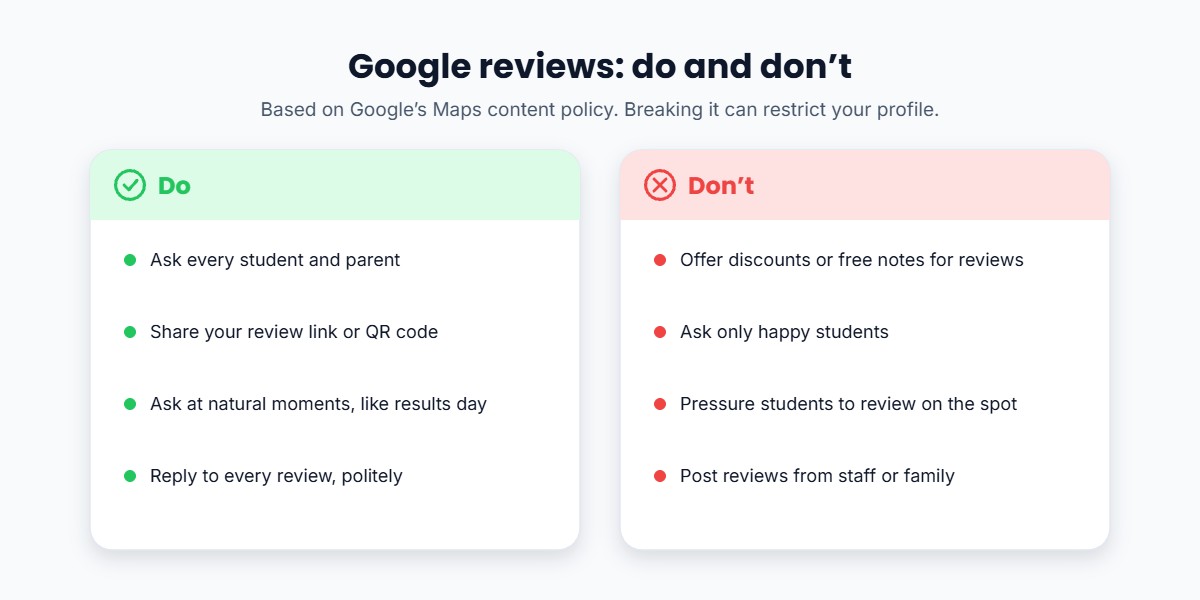
Reviews help parents decide, and Google says more reviews and positive ratings can help local ranking. But Google’s Maps content policy is strict:
- Don’t offer incentives (discounts, free notes or gifts) in exchange for reviews.
- Don’t ask only happy students. Selectively asking for positive reviews, or discouraging negative ones, isn’t allowed.
- Don’t pressure students to review on the spot, or ask staff to collect a quota of reviews.
- Don’t post reviews from family, staff or multiple accounts.
Google can remove such reviews and restrict your profile, for example by blocking new reviews for a period or showing a warning to visitors.
What you can do: ask every family, at natural moments such as after results or at the end of a course, to share their honest experience. Make it easy with your review link or a QR code at the front desk. This fits well with your regular parent communication.
Reply to Every Review
- Thank people for positive reviews, and mention something specific.
- Respond calmly to negative reviews. Acknowledge the issue, avoid arguing, and offer to talk offline.
- Keep replies conversational, not promotional. Don’t use replies to advertise offers.
- Never share a student’s marks or personal details in a reply.
Common Mistakes Coaching Institutes Make
- Stuffing keywords or locations into the business name
- Creating duplicate listings for the same centre
- Registering the profile on a staff member’s personal account
- Listing a virtual office or an address without signage
- Offering discounts or free material for reviews
- Ignoring negative reviews
- Letting photos, hours and phone numbers go out of date
How Classplus Can Help
Your Google Business Profile brings parents to your door. What they find next decides whether they enrol. With Classplus, your institute gets its own branded app and website, so the link on your profile leads to a professional place where families can see your courses, book a demo and pay online. After admission, students learn in your app with live classes, recorded lectures, tests and study material, and you manage students, batches and notifications in one place.
Turn local searches into admissions. Give parents a professional branded app and website to land on. Explore Classplus →
Conclusion
For a coaching institute with a physical centre, a verified, complete and honest Google Business Profile is one of the most valuable free marketing tools available. Use your real name, complete every field, keep photos fresh, and build genuine reviews steadily.
Combine it with your offline marketing, a referral program and, if you have the budget, Google Ads to increase admissions season after season.
Frequently Asked Questions
Is Google Business Profile free for coaching institutes?
Yes. Creating and managing a Google Business Profile is free. Google says there’s no way to request or pay for a better local ranking.
Can an online coaching business get a Google Business Profile?
No. Google’s eligibility guidelines list online-only businesses as ineligible. A business must make in-person contact with customers during its stated hours.
Can I add keywords like “best JEE coaching” to my business name?
No. Your name should match your real-world name on your signboard and website. Adding services or locations can lead to suspension.
How do I verify my coaching institute on Google?
Google offers a method based on your business, such as phone, email, a live video call or a postcard. If video verification is available, Google recommends it.
Can I offer a discount to students who leave a Google review?
No. Google prohibits offering incentives such as discounts or free goods in exchange for reviews. Ask every student for honest feedback instead.
How can my coaching institute rank higher on Google Maps?
Complete every field, choose an accurate category, keep details consistent, add photos, reply to reviews and build genuine reviews over time. Distance from the searcher also matters, which you can’t control.