When you ran two batches, everything lived in your head. Now you have seven: morning and evening, Class 11 and 12, a droppers’ batch and a weekend crash course. A teacher is double-booked on Thursday, last week’s test went to the wrong group, and nobody is sure which students in the evening batch still owe fees.
More batches should mean more growth, not more confusion. This guide gives you a simple system for batch management in your coaching institute: how to structure batches, build a clash-free timetable, and keep attendance, tests, content and fees organised batch by batch.
What Is Batch Management in a Coaching Institute?
Batch management is how you organise students into groups and run each group smoothly. It covers:
- Which students are in which batch
- When and where each batch meets, and who teaches it
- What content, assignments and tests each batch gets
- Attendance, performance and fee status for each batch
Done well, every student, teacher and parent knows exactly what is happening. Done badly, small mix-ups pile up into complaints and dropouts.
Signs Your Batch System Is Breaking
- Teachers or rooms are double-booked
- Students receive notes or tests meant for another batch
- You can’t quickly say which batch has the lowest attendance
- Fee dues are tracked in a separate notebook from the student list
- Batch changes (a student moving from evening to morning) aren’t recorded anywhere
- Parents hear about schedule changes late, or not at all
If two or more sound familiar, it’s time to put a system in place.
How to Manage Multiple Batches: Step by Step
Step 1: Define a Clear Batch Structure
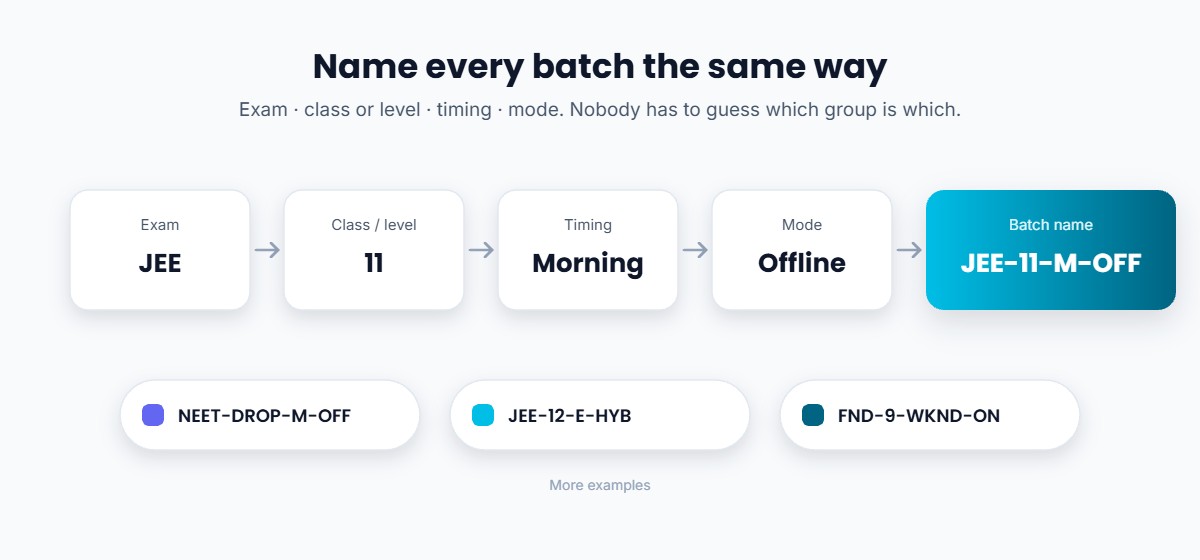
Group students by what actually matters for teaching: exam or class, level, timing and mode (offline, online or hybrid). Then give every batch a consistent name, so nobody has to guess.
| Exam / class | Level | Timing | Mode | Batch name |
|---|---|---|---|---|
| JEE | Class 11 | Morning | Offline | JEE-11-M-OFF |
| JEE | Class 12 | Evening | Hybrid | JEE-12-E-HYB |
| NEET | Droppers | Morning | Offline | NEET-DROP-M-OFF |
| Foundation | Class 9 | Weekend | Online | FND-9-WKND-ON |
A naming convention sounds small, but it prevents most mix-ups in WhatsApp groups, test lists and fee records.
Step 2: Fix Batch Size and Capacity
Decide a maximum size for each batch based on your room, your teaching style and the subject. Keep a little room for late admissions. If you follow the 2024 coaching guidelines’ space norm of at least one square metre per student, let it guide your offline batch sizes (see our guide to coaching institute registration).
Step 3: Build a Clash-Free Timetable
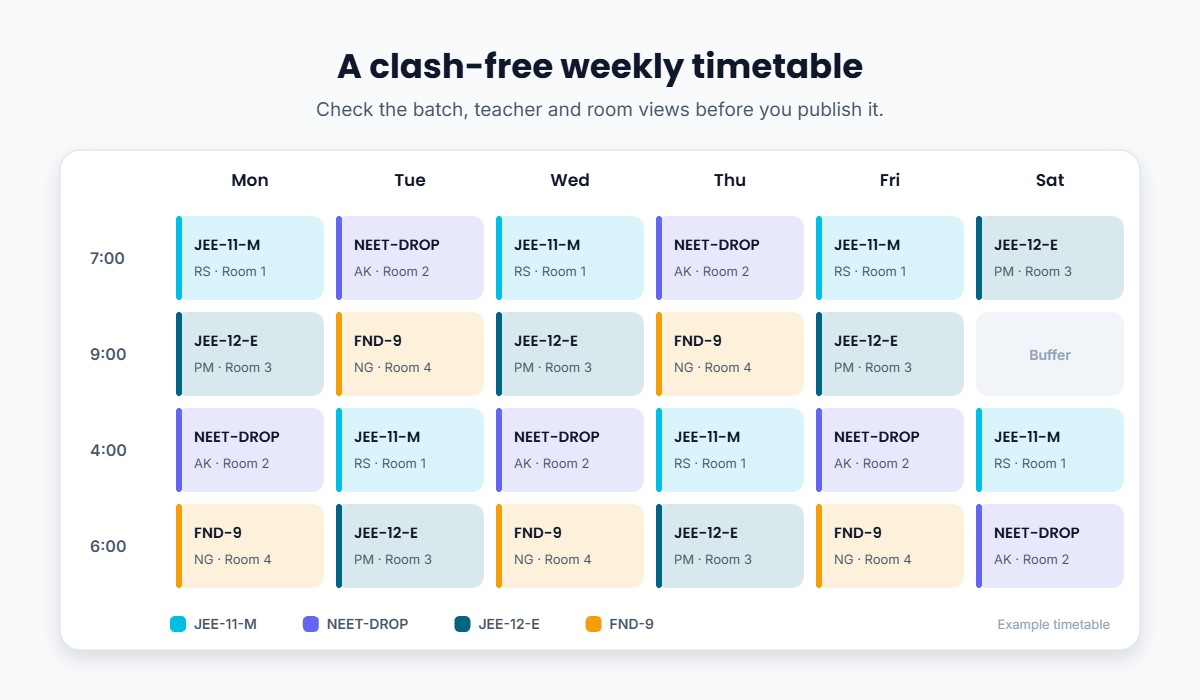
Build the timetable from three views at once:
- Batch view: what each batch has on each day
- Teacher view: that no teacher is in two places at once, with travel or rest time between classes
- Room view: that no two batches share a room at the same time
Keep a weekly off for students, and a buffer slot each week for extra classes or doubt sessions. Lock the timetable a week in advance and announce changes in one place, not across five groups.
Step 4: Assign Teachers, and a Back-Up
Give each batch a lead teacher per subject, and name a back-up for leave days. Students settle faster with a consistent teacher, and a planned back-up avoids last-minute cancellations.
Step 5: Keep Content and Tests Batch-Specific
Upload notes, recordings and assignments to the right batch only. Schedule tests batch-wise, so results compare students who were taught the same syllabus. A regular test series for each batch also shows you which batch needs extra attention.
Step 6: Track Attendance for Every Batch
Mark attendance in every class, live or recorded. Set a minimum attendance level and follow up early with students who slip. Our guide on taking attendance online has practical options.
Step 7: Link Fees to Batches
Record fee plans, instalments and dues against each student’s batch. When fee status sits next to attendance and test results, it’s easier to spot students at risk of dropping out. Good coaching fee management saves hours every month.
Step 8: Communicate Batch by Batch
Send timetable changes, test reminders and holiday notices only to the batches they affect. One clear notification beats ten forwarded messages.
Run a Weekly Batch Review
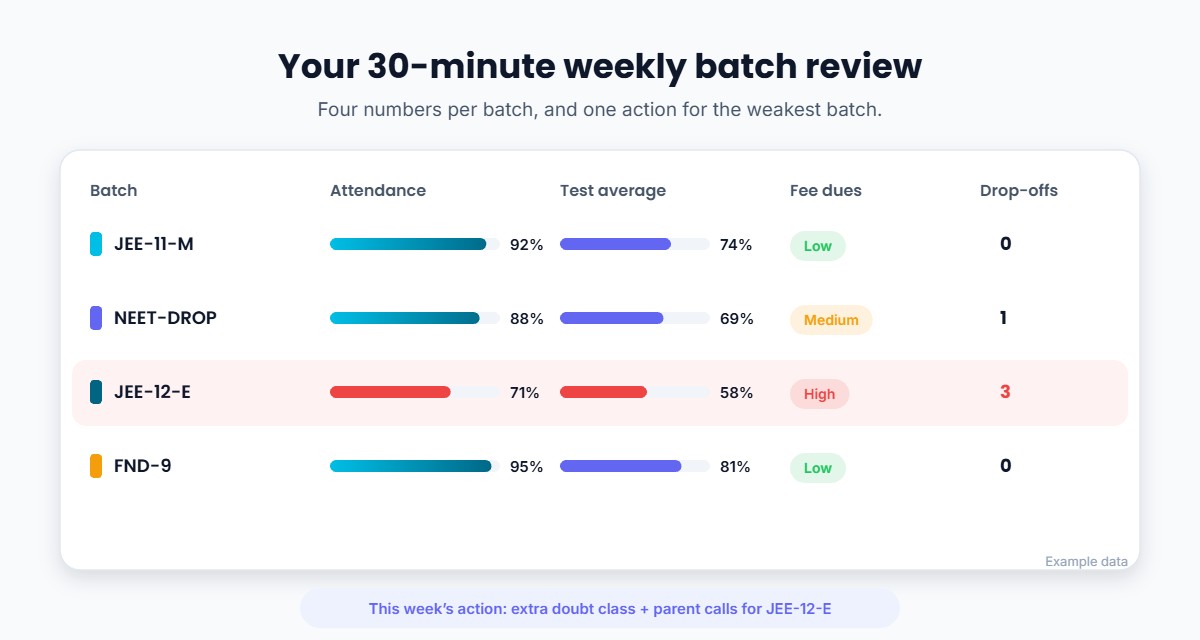
Spend 30 minutes every week looking at each batch on four numbers:
- Attendance: which batches are slipping?
- Test performance: average scores and weakest topics
- Fee dues: pending amounts and overdue instalments
- Drop-offs: students who have stopped attending
Pick one action for the weakest batch each week, for example an extra doubt class or a parent call. Small weekly fixes protect student retention far better than a big end-of-term review.
Spreadsheets or Software?
| Spreadsheets and WhatsApp groups | Coaching management software | |
|---|---|---|
| Good for | 1–3 small batches | Several batches, teachers and modes |
| Timetable clashes | Checked by hand | Easier to spot and fix |
| Content and tests per batch | Shared manually | Assigned to the batch once |
| Attendance and fees | Separate sheets | In one place, per student |
| Parent and student updates | Many groups | Targeted notifications |
If you’re spending more time managing batches than teaching them, it’s a sign to move to dedicated coaching institute management software.
Common Mistakes to Avoid
- No naming convention. “Morning batch” means nothing once you have three morning batches.
- Overfilling popular batches. Quality drops and complaints rise.
- Changing timetables at the last minute without a single announcement channel.
- Sharing all content with all batches. It confuses students and gives away paid material.
- Tracking fees separately from attendance and performance.
- Skipping the weekly review. Problems become visible only when students leave.
How Classplus Can Help
With Classplus, your institute gets its own branded app where you can organise students into batches and run each batch from one place:
- Schedule live classes and share recordings with the right batch
- Assign notes, assignments and tests batch-wise
- Set attendance criteria and track attendance
- See test performance for each batch
- Collect fees online and track dues
- Send notifications to a specific batch
Run every batch from one app. Classes, content, tests, attendance, fees and notifications, organised batch by batch. Explore Classplus →
Conclusion
Managing multiple batches gets easier with a clear structure, a clash-free timetable, batch-specific content and tests, and attendance and fees tracked in one place. Add a 30-minute weekly review and you’ll catch problems while they’re still small.
Start with the naming convention and timetable this week. They solve most of the confusion on their own.
Frequently Asked Questions
How do you manage multiple batches in a coaching institute?
Give every batch a clear name and structure, build a timetable that checks batch, teacher and room clashes, keep content and tests batch-specific, and track attendance and fees for each batch in one place.
What is the ideal batch size for coaching classes?
It depends on your room, subject and teaching style. Many institutes keep smaller batches for doubt-heavy subjects and senior classes. If you follow the 2024 guidelines, plan at least one square metre of space per student for offline classes.
How do I make a timetable for multiple coaching batches?
Plan from three views (batch, teacher and room) so no teacher or room is double-booked. Add a weekly off and a buffer slot, lock the timetable a week ahead, and announce changes in one channel.
Should I use software for batch management?
Spreadsheets work for a few small batches. Once you have several batches, teachers or a hybrid setup, coaching management software saves time on timetables, attendance, tests, fees and communication.
How do I handle a student who wants to change batches?
Check capacity in the new batch, record the change with a date, move the student’s content and test access, update their fee record if timings or plans differ, and inform both batch teachers.
How often should I review batch performance?
Weekly. Look at attendance, test averages, fee dues and drop-offs for each batch, and take one action for the weakest batch.