
1. Setup Your Pentab in Just 5 Minutes
Pentab Setup in 5 Minutes:
Draw/Write Naturally for Online Classes (2025)
In today’s digital learning era, keeping students engaged and communicating ideas clearly are more important than ever. A Pentab (pen tablet) can transform your teaching or learning experience by allowing you to draw and write just like you would on paper. This blog will walk you through a quick setup, highlight the key benefits, and explore how tools like ClassPlus can further enhance your online teaching journey.
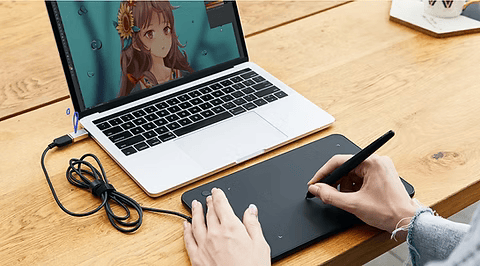
2. Why Use a Pentab for Online Classes? ✍️
A Pentab brings many advantages to the virtual classroom:
- Natural Writing Experience: Writing and drawing with a Pentab feels smooth and accurate, providing a more intuitive experience compared to using a mouse. This natural interaction can help you convey complex ideas more effectively. 🖊️
- Enhanced Engagement: With a Pentab, you can easily add diagrams, annotate slides, or sketch ideas live during your lessons. This capability makes your classes more interactive and visually appealing, helping to maintain student interest and participation. 📊
- Versatility: Whether you teach math, science, art, or language, a Pentab fits a variety of teaching styles and subjects. This adaptability allows you to cater to different learning preferences, making your lessons more inclusive. 🌍
- Professional Presentation: Using a Pentab can elevate your teaching materials, giving them a polished, professional look. This can be particularly beneficial when you’re trying to attract new students or engage parents in your educational approach.
3. Quick Setup Guide: Get Started in 5 Minutes ⏰
Setting up your Pentab is easy. Follow these steps to begin:
Step 1: Choose the Right Pentab
Pick a model that matches your needs. Popular options include:
- Wacom Intuos: Known for its sensitivity and accuracy, making it a favorite among educators. 🎨
- Huion Inspiroy: A budget-friendly option that doesn’t compromise on performance, ideal for new educators. 💰
- XP-Pen Deco: Great for both beginners and pros, with a range of features that enhance usability. ⭐
Step 2: Install Necessary Drivers
- Download Drivers: Visit the manufacturer’s website and download the latest drivers for your Pentab model.
- Install Drivers: Run the installation file and follow the on-screen instructions. This step ensures your device works smoothly with your computer, enabling you to focus on teaching rather than troubleshooting. 💻
Step 3: Connect Your Pentab
- USB Connection: Plug the device into your computer using the included USB cable. This straightforward setup allows for immediate use. 🔌
- Wireless Option: If your Pentab supports Bluetooth, connect it wirelessly by following the pairing steps. This flexibility allows you to move freely during your lessons. 📶
Step 4: Configure Settings
- Access Settings: Open your Pentab’s control panel or settings menu.
- Adjust Sensitivity: Set the pen pressure to your comfort level, which can significantly enhance your writing and drawing experience. ⚙️
- Customize Buttons: Many Pentabs come with customizable buttons that you can assign to functions like undo, erase, or zoom—making your workflow faster and more efficient. 🖱️
Step 5: Test Your Setup
Open a note-taking or drawing app like Microsoft OneNote, Zoom, or Google Jamboard. Try writing, sketching, or drawing to ensure everything works well. This testing phase is crucial to ensure a seamless teaching experience. 📝
4. Tips for Effective Use:
- Practice Regularly: The more you use your Pentab, the faster it becomes second nature. Regular practice will help you become more proficient and confident in your digital teaching skills.
- Explore Software: Experiment with different apps that support digital writing and drawing. Each one offers unique features that can enhance your lessons and engage your students.
- Engage Your Audience: Use the Pentab to create lively, interactive lessons that captivate your students’ attention. Incorporating visual elements can help clarify complex concepts and make learning more enjoyable.
5. How Can Classplus Enhance Your Teaching Journey?
As you embrace the use of a Pentab, consider how platforms like Classplus can further support your online teaching efforts. Classplus offers a range of tools and resources designed specifically for educators looking to innovate their teaching methods. Here’s how:
- Integrated Learning Management System: Classplus provides an intuitive platform that integrates seamlessly with your teaching tools, allowing you to manage classes, assignments, and student interactions all in one place. This integration can save you time and streamline your processes.
- Resource Sharing: Easily share your Pentab created materials with students through Classplus, ensuring they have access to high-quality, engaging content that enhances their learning experience.
- Community Support: By joining Classplus, you become part of a vibrant community of educators. Share tips, resources, and best practices with fellow teachers who are also exploring innovative teaching methods.
- Professional Development: Classplus frequently offers webinars and training sessions focused on effective online teaching strategies. These resources can help you stay ahead of the curve and continuously improve your skills.
6. Conclusion
Using a Pentab can significantly enhance your online teaching experience, making lessons more engaging and effective. As the demand for innovative teaching methods grows, tools like Pentabs are becoming essential for educators looking to stand out in the digital landscape.
By incorporating technology into your teaching strategy, you can create a dynamic and interactive learning environment that resonates with today’s learners. Platforms like Classplus can empower you to take your teaching to the next level, providing the support and resources you need to thrive in this new educational landscape.
Also Read : How You Can Earn ₹50K from Your First Online Course as a Teacher




