
Digital classrooms have brought about a new normal in the rapidly changing educational environment. Whether it is online lectures, interactive learning materials and assignments, electronic books, or collaborative projects, it’s no secret that the list of students’ needs includes tablets. Most students, however, are on a budget. Does that mean you should overpay for a less-than-ideal learning device? Not at all. There are great tablets under ₹20,000 in the Indian market that will cover your needs, provide a decent learning experience, and save you some money.
While this guide will help you assess the essential characteristics you are to consider while purchasing a tablet for the digital classroom, it will also showcase some of the best tablets under ₹20k available on the Indian market in all budget ranges, keeping you well-informed about your educational choices.
Why a Tablet for Digital Classrooms?
Laptops are more powerful for the price and offer students superior typing quality, while smartphones are compact and portable. Tablets are the best of both worlds for students. There is more to why they are the best option for a digital classroom:
- Portability and Lightweight Design: They are much more lightweight and portable than laptops and feature a small form factor. This means that you can take them to classes, the library, or leisurely study without the extra heft.
- Touchscreen Interface and Stylus Support: You can use them how you would a laptop’s trackpad, but the touchscreen is considerably simpler and faster. Many models in this price range also support a stylus , which is crucial for note-taking, PDF marking, diagram creation, and other activities that require pen and paper.
- Immersive Learning Experience: Bigger screens imply a watch screen for video lectures, e-books, and presentations. Although using a tablet for several hours per day can induce eyestrain, it is much better than a smartphone.
- Cost-Effectiveness: The Teens typically save money on a laptop, which allows more students to get one.
- Versatility: They can be used for entertainment, browsing, and light gaming outside the classroom.
- Long Battery Life: Tablets are not large power consumers and allow students to enjoy a full day of schooling without spending all night looking for a socket.
When exploring the large market of budget tablets, keeping these key features in mind will help you narrow down your options:
Display Quality and Size:
Size: For comfortable viewing of lectures, e-books, and multitasking, a 10-inch or larger display is generally recommended. Tablets around 11-12 inches provide an even more immersive experience.
Resolution: Aim for at least Full HD (1920 x 1080 pixels) or 2K resolution. Higher resolution results in sharper text and clearer images, which is important for reading and detailed visual content.
Refresh Rate: While 60Hz is standard, some tablets in this range offer 90Hz or even 120Hz refresh rates. These provide smoother scrolling and a better overall user experience.
Eye Comfort Features: Look for features like low blue light filters or DC Dimming. These can help reduce eye strain during extended use.
Performance (Processor and RAM):
Processor: For general e-learning tasks, a good octa-core processor from brands like MediaTek (Helio G series) or Qualcomm (Snapdragon 600 or 700 series) will work well. These handle everyday apps, video calls, and light multitasking smoothly.
RAM: 4GB RAM is the minimum for smooth operation today. Ideally, aim for 6GB or 8GB RAM for improved multitasking and longer usability.
Storage:
Internal Storage: 64GB is a decent starting point, but 128GB is recommended, especially if you plan to download many e-books, lecture videos, and apps.
Expandable Storage: A microSD card slot is a significant advantage, allowing you to increase storage for large files without depending solely on cloud storage.
Battery Life: A tablet for digital classrooms should offer at least 8 to 10 hours of real-world battery life on a single charge. Look for battery capacities of 7000mAh or more. Fast charging support is a bonus; it lets you quickly recharge the battery when you’re short on time.
Cameras:
Front Camera: A good front-facing camera, with at least 5MP—ideally 8MP or more—is essential for clear video calls during online classes and group discussions.
Rear Camera: While not as important for academics, a decent rear camera with 8MP or more can be helpful for scanning documents or quickly capturing images.
Audio Quality:
Tablets with dual or quad speakers, especially those with Dolby Atmos support, offer a more immersive audio experience for lectures, videos, and entertainment.
Connectivity:
Wi-Fi: Wi-Fi 5 (ac) is standard; however, Wi-Fi 6 provides faster and more stable connections if it’s available.
Cellular Connectivity (Optional): If you need internet access on the go without relying on a hotspot, consider a tablet with LTE or even 5G support, though 5G might increase the budget slightly.
Bluetooth: This is essential for connecting wireless headphones, keyboards, and other peripherals.
USB-C Port: This allows for faster charging and data transfer.
Stylus Support (if applicable): If note-taking or creative tasks are a priority, ensure the tablet supports a stylus. Check if the stylus is included in the box or if you need to purchase it separately.
.
Best Tablets Under ₹20,000 for Digital Classrooms (India)
Based on the criteria mentioned and what the current market offers, here are some of the best tablets under ₹20,000 for students in India:
Samsung Galaxy Tab A9+
Why it’s great: Samsung delivers a reliable option in the budget segment with the Tab A9+. It has an 11-inch display with a 90Hz refresh rate for smooth visuals. Powered by a Qualcomm Snapdragon processor (usually the Snapdragon 695), it performs well for browsing, media use, and light gaming. With 8GB RAM and 128GB expandable storage, it’s a strong value. It also has quad speakers with Dolby Atmos for great audio and often comes with 5G options, making it ready for future mobile needs.
Ideal for: Students seeking a trusted brand, good display for media, and possible 5G for learning on the move.
OnePlus Pad Go
Why it’s great: The OnePlus Pad Go features a large 11.35-inch 2.4K ReadFit display, great for reading and content consumption, along with Dolby Atmos quad speakers for immersive sound. It has the MediaTek Helio G99 processor and typically offers 8GB RAM and 128GB storage (expandable). Its TUV Rheinland-certified Low Blue Light technology is great for long study sessions. With a sleek design and an 8000 mAh battery with 33W SUPERVOOC charging, it makes for a strong choice.
Ideal for: Students who want a large, eye-friendly display, great audio, and fast charging for a comfortable learning and entertainment experience.
Lenovo Tab M11 (with Pen option)
Why it’s great: Lenovo is a strong player in the budget tablet market, and the Tab M11 often includes a Lenovo Pen, making it a great choice for note-takers and creative students. It features an 11-inch FHD (1920×1200) 90Hz display and Dolby Atmos quad speakers. With 8GB RAM and 128GB storage (expandable), it handles daily tasks easily. Its IP52 rating adds durability against spills and dust.
Ideal for: Students who need stylus support for notes, drawings, or annotations, along with solid performance and a good display.
Honor Pad X9
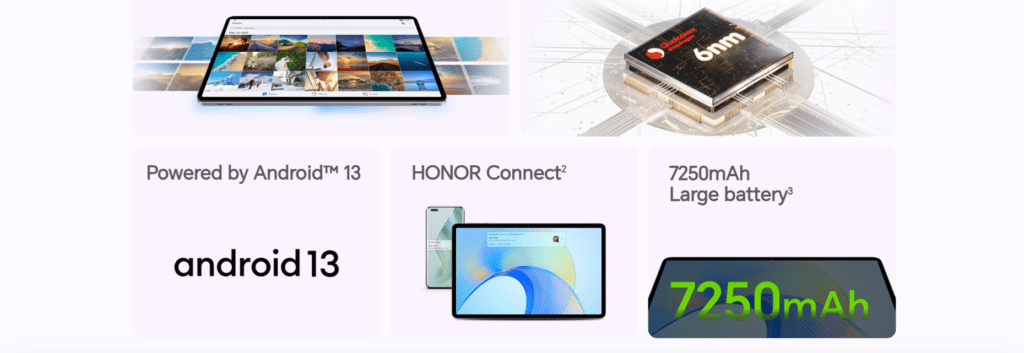
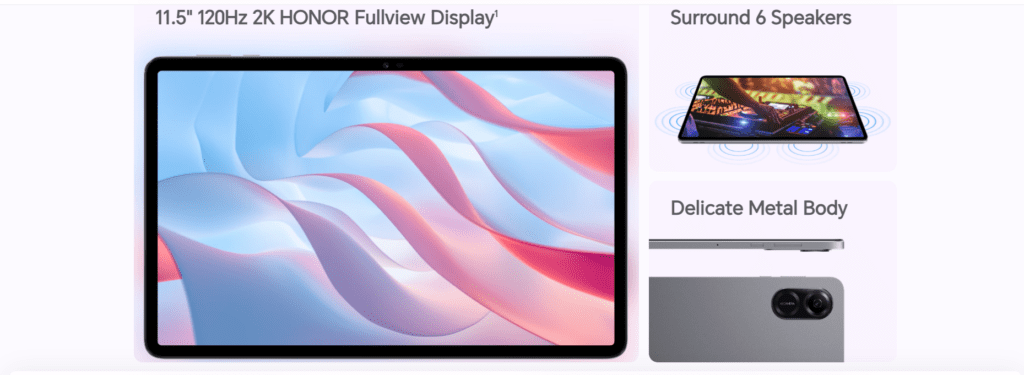
Why it’s great: The Honor Pad X9 impresses with its large 11.5-inch 2K display and a unique six-speaker system, providing excellent sound quality for media and online classes. It runs on the Snapdragon 685 processor, usually with 4GB RAM and 128GB storage. Its metal build gives it a premium feel. Battery life is also strong, often lasting up to 13 hours under normal use.
Ideal for: Students who want a large, vibrant display and superior sound for immersive learning and entertainment.
Realme Pad 2
Why it’s great: The Realme Pad 2 offers great value with its 11.5-inch 2K display featuring a 120Hz refresh rate, making visuals smooth. With the MediaTek Helio G99 chip and options for 6GB or 8GB RAM and 128GB storage, it ensures smooth app performance. Its massive 8360mAh battery provides all-day endurance, crucial for students.
Ideal for: Students seeking the largest screen within this budget with a high refresh rate and excellent battery life for extensive content use and learning.
Redmi Pad SE
Why it’s great: The Redmi Pad SE is a solid budget-friendly choice that doesn’t compromise on key features. It typically has an 11-inch Full HD display, a Snapdragon 680 processor, and options for 4GB or 8GB RAM with 128GB storage. It also includes quad speakers with Dolby Atmos and a strong 8000mAh battery. It’s known for offering good value within Xiaomi’s ecosystem.
Ideal for: Students on a tight budget looking for a reliable tablet with a good display, decent performance, and strong audio for online learning and entertainment.
Conclusion
As a result, laptops bring more power, and smartphones bring more straightforward utilities, and tablets land somewhere in the middle. On the other hand, students in the digital classroom have a unique advantage: the school experience. The tablet experience is available to students via their touchscreen devices that allow them to scroll, swipe, and use a stylus to engage actively at a reasonably low cost. Indian audiences can purchase tablets for less than ₹20,000, and top-tier manufacturers offer devices in this range. You won’t have the need to spend the extra amount to use advanced e-learning capabilities. While device parameters are running in your brain for choosing the best, there are six tablets to consider based on display, processor, storage, battery, and price points. These tablets are the Samsung Galaxy Tab A9+, OnePlus Pad Go, Lenovo Tab M11, Honor Pad X9, Realme Pad 2, and Redmi Pad SE. Since you are now aware of the parameters, you can choose the best device that supports you correctly from the pricing of your device list.




